
The best way to track HubSpot Meetings bookings as conversions in Google Ads
A step-by-step guide to recording accurate Google Ads conversions whenever a lead books time with you through HubSpot Meetings

Use Attributer to capture the GCLID on the HubSpot contact when someone books through HubSpot Meetings, then pass it back to Google Ads as a conversion (either the moment they book, or later once that lead turns into a paying customer).
Google Ads can be one of the most reliable ways to bring fresh leads and customers through your door, but getting the conversion tracking set up correctly is trickier than it should be.
Take the Google Tag Manager approach and you'll quickly find yourself writing custom code just to detect a booking, then wiring up triggers, tags, variables and a pile of other settings.
And the simpler routes, like counting visits to a booking confirmation page, silently drop as much as 30% of your conversions thanks to ad blockers, browser privacy features (the kind Safari ships with), or a prospect tapping your ad on their phone and only booking later from their laptop.
So where does that leave you?
In this article, we'll walk through how to record conversions properly in Google Ads whenever someone books a meeting with you through HubSpot Meetings, using an approach known as server-side tracking.
Why you need to be doing server-side tracking in Google Ads
The traditional approaches to tracking Google Ads conversions, whether that's counting confirmation page views or firing events with Google Tag Manager, all share the same flaws. Research suggests they can miss up to 30% of your conversions.
There are a few reasons for that:
- Ad Blockers. They prevent the Google Tag from loading in the first place, so none of the visitor's activity on your site ever gets recorded.
- Browser privacy features. Browsers such as Safari stop the Google Tag from tracking visitors after a day or so, so an ad click today and a booking three days later are never joined up.
- People switching devices. Someone might click your ad on their work laptop and then book from their phone later on, and browser tracking simply can't connect those two moments.
This is exactly why server-side tracking makes sense. Instead of relying on something happening in the browser (like a visitor reaching a confirmation page) and hoping the Google Tag catches it, you send a direct, private message to Google containing the lead's details, which leaves ad blockers and privacy settings with nothing to block.
The results speak for themselves. According to Google's own figures, moving to server-side tracking delivers a 23% average increase in total recorded conversions and a 10% reduction in cost per conversion, purely because Google's algorithms get better data to learn from and can target the right people more accurately.
How to track HubSpot Meetings bookings in Google Ads using server-side conversion tracking
You've got two options here, and which suits you best hinges on the point at which you'd like the conversion recorded in Google Ads.
Option 1: When a lead books a meeting
A tool like Converly makes it easy to fire a server-side conversion to Google Ads when someone books a meeting through HubSpot Meetings.
Rather than writing custom code in Google Tag Manager to detect the booking was completed, pulling out the lead's details, hashing them with SHA-256 and sending them over to Google's API, you get a straightforward visual builder that lets you put the whole flow together in a handful of clicks.

You simply choose a trigger (such as a meeting being booked through HubSpot Meetings) and line up the actions you want to follow (like sending a conversion to Google Ads).
From there, Converly keeps monitors for new bookings, collects the lead's name, email and phone, hashes the details with SHA-256, and forwards them to Google Ads. It also grabs the GCLID and other information about how the person found you, and sends those across with the conversion too (which gives Google a far better shot at connecting the booking to the exact campaign, ad and keyword that first brought the lead to you).
What you end up with is the full upside of server-side tracking (that 23% average lift in recorded conversions and 10% drop in cost per conversion) without touching a line of custom code, learning what SHA-256 is, or going anywhere near Google's API yourself.
Option 2: When a lead becomes a customer
Because HubSpot Meetings bookings already create contacts inside HubSpot, you can hold off and send the conversion back to Google Ads later in the sales cycle instead (for example, once a lead actually becomes a paying customer).
The trick is to capture one extra piece of data with every booking and keep it attached to the contact in HubSpot. Here's how it works:
1. Install Attributer and add a GCLID property in HubSpot
To get going, start a 14-day free trial of Attributer and add its small snippet of code to your website.
After that, create a contact property in HubSpot to hold the GCLID (the unique ID Google assigns to every ad click, which you'll need later to record the conversion).
2. Attributer writes the GCLID onto the HubSpot contact
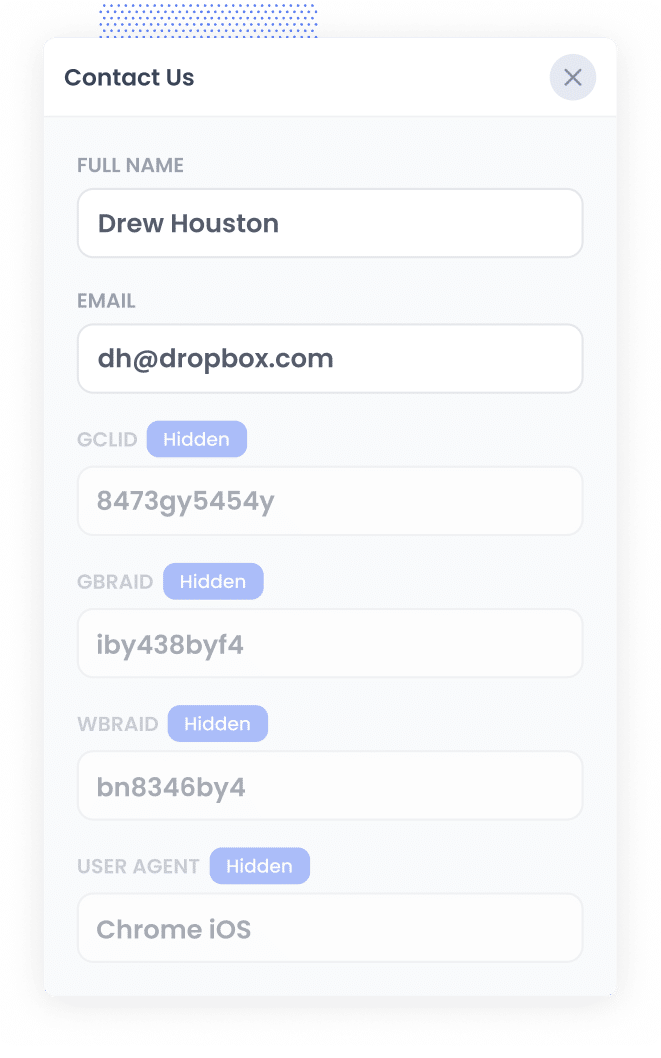
The moment someone clicks one of your Google Ads and arrives on your site, Attributer grabs the GCLID and keeps it in their browser (so it sticks around even if they wander across a few pages, or leave and come back another day).
Then, when they book a meeting through HubSpot Meetings, Attributer passes the GCLID into the contact property you set up, and it's saved against that contact in HubSpot.
3. Send the data to Google Ads
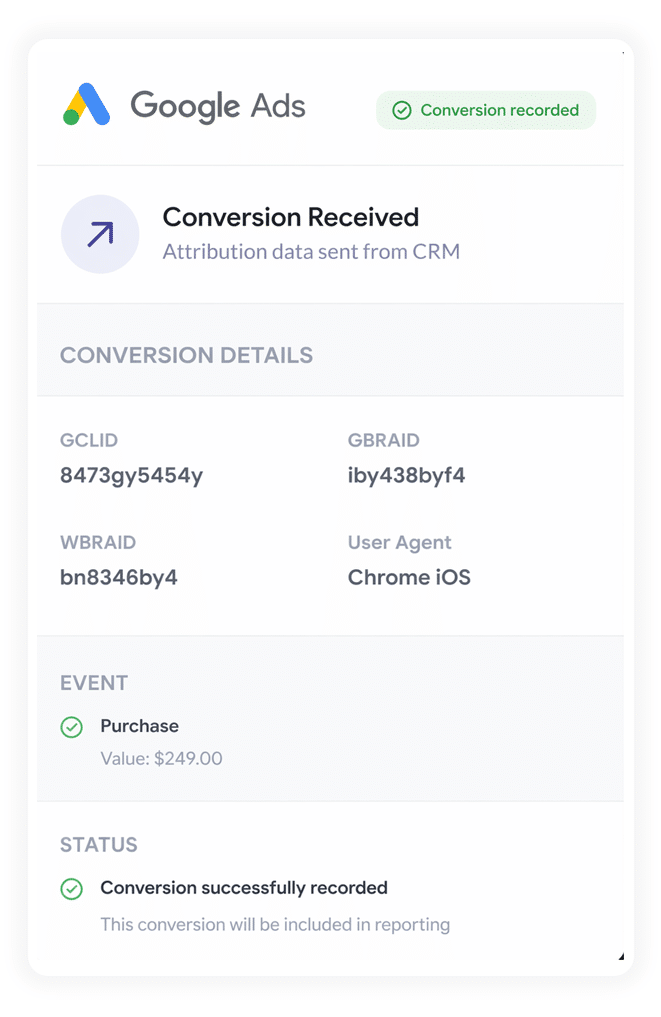
When a meaningful milestone is reached (a deal is created in HubSpot, or the lead becomes a paying customer), you can send everything back to Google Ads to record the conversion.
Zapier and Make are ideal for this. Both plug straight into HubSpot and can fire the conversion to Google Ads at whatever point suits you, whether that's when a deal opens, when it's marked closed won, or somewhere in between.
They also have a simple mapping screen, so passing the GCLID that Attributer captured into the right field in the Google Ads API is straightforward. HubSpot's own Google Ads integration can sync offline conversions too, if you'd rather keep everything inside HubSpot.
Why sending server-side conversions to Google Ads is the best approach
Four things in particular make it the most trustworthy way to capture your conversions:
1. Overcomes Ad Blockers
Traditional tracking (counting confirmation page views, or using Google Tag Manager) relies on scripts (liek the Google Tag) loading inside the visitor's browser, and ad blockers and privacy-first browsers routinely stop those scripts from ever running.
Recent studies estimate that more than 30% of internet users now run some kind of ad blocker.
Server-side tracking sidesteps the problem entirely. Because the conversion goes straight to Google's servers, ad blockers never see it, and every lead gets counted.
2. Bypasses Safari & iOS Privacy Limitations
Apple's Intelligent Tracking Prevention (ITP) usually wipes tracking cookies within a day or two, so if someone doesn't book on the same day they clicked, the connection between that ad click and the eventual conversion is lost.
Server-side tracking gets around this by sending the lead's name, email, phone and so on to Google with every conversion. That lets Google match the conversion back to the original ad click, no matter how long the gap between the click and the booking is.
3. Works across devices
It's common for a lead to first come across your site on one device (their phone, say) and then wait until they're back at a computer before they actually book.
Standard browser tracking has no way to connect those two visits, since they happen on different devices.
But sending identity data (name, email and the like) directly to the server lets Google join the sessions up and give your ads the credit they deserve for getting the ball rolling.
4. Eliminates duplicate and messy data
Beyond all of that, browser-based tracking opens the door to other errors, like logging the same conversion twice when a page gets refreshed, or dropping data altogether because of a slow connection or a request that never finishes.
Server-side tracking is much cleaner. It only records a conversion when a booking actually completes (rather than when a confirmation page happens to load), so the conversion numbers in Google Ads stay a lot closer to the true number of meetings you're booking.
3 reports you can run when you properly send conversions to Google Ads from HubSpot Meetings
Over 15 years running marketing teams, I've poured millions into Google Ads and built more reports than I care to remember trying to work out what was actually delivering.
These are the 3 I found myself returning to again and again:
1. Conversions by Keyword
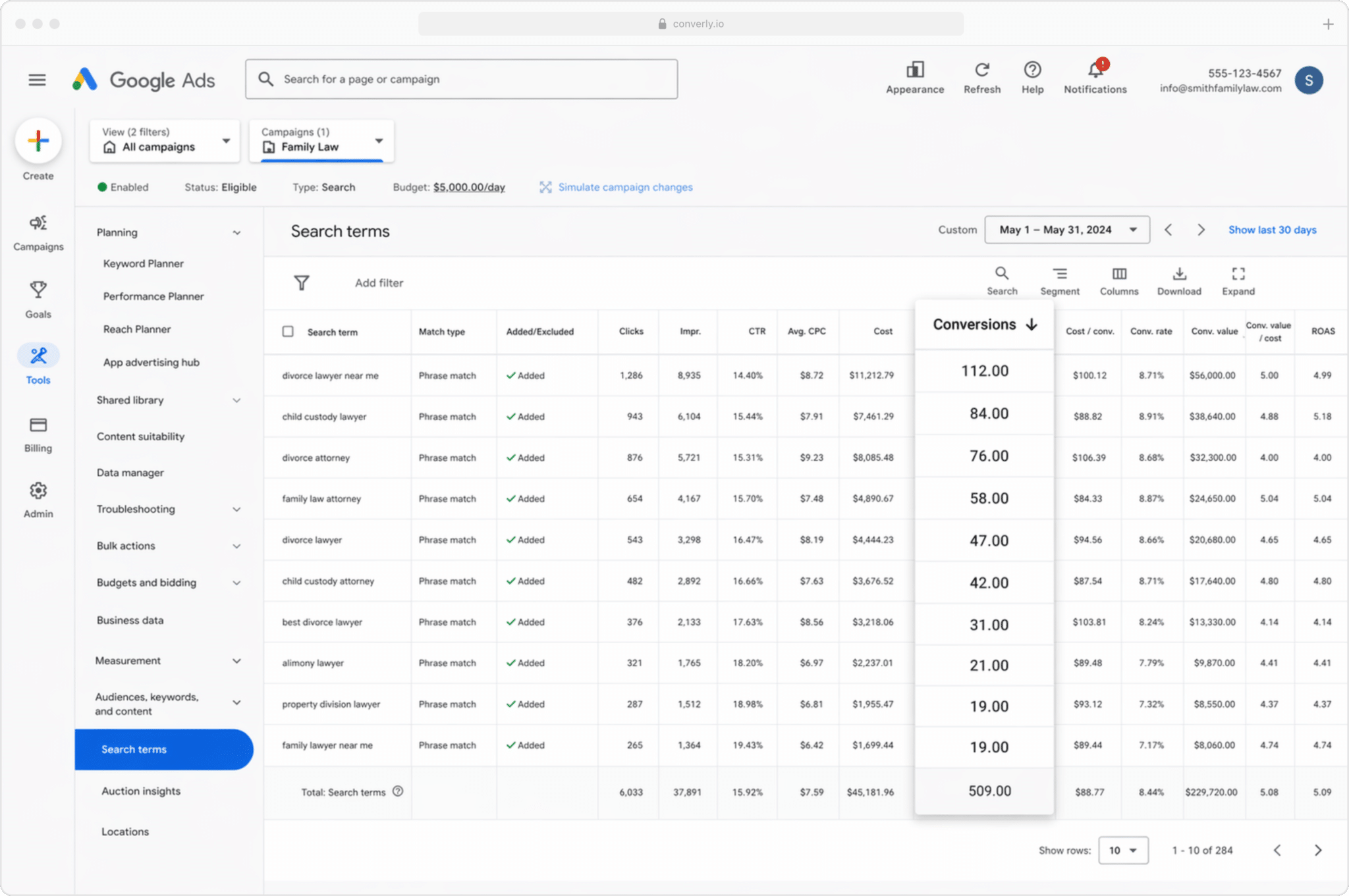
Most businesses bid on a mix of keywords spread across several campaigns, often covering different services (a remodeling company might bid on kitchen renovations in one campaign and bathroom remodels in another).
This report reveals which of those keywords are genuinely generating conversions, as opposed to piling up impressions and clicks that never become real leads.
It shows you clearly which keywords are pulling their weight for your business and which aren't, and therefore which ones deserve more of your budget to bring in more leads.
2. Conversion Value by Campaign
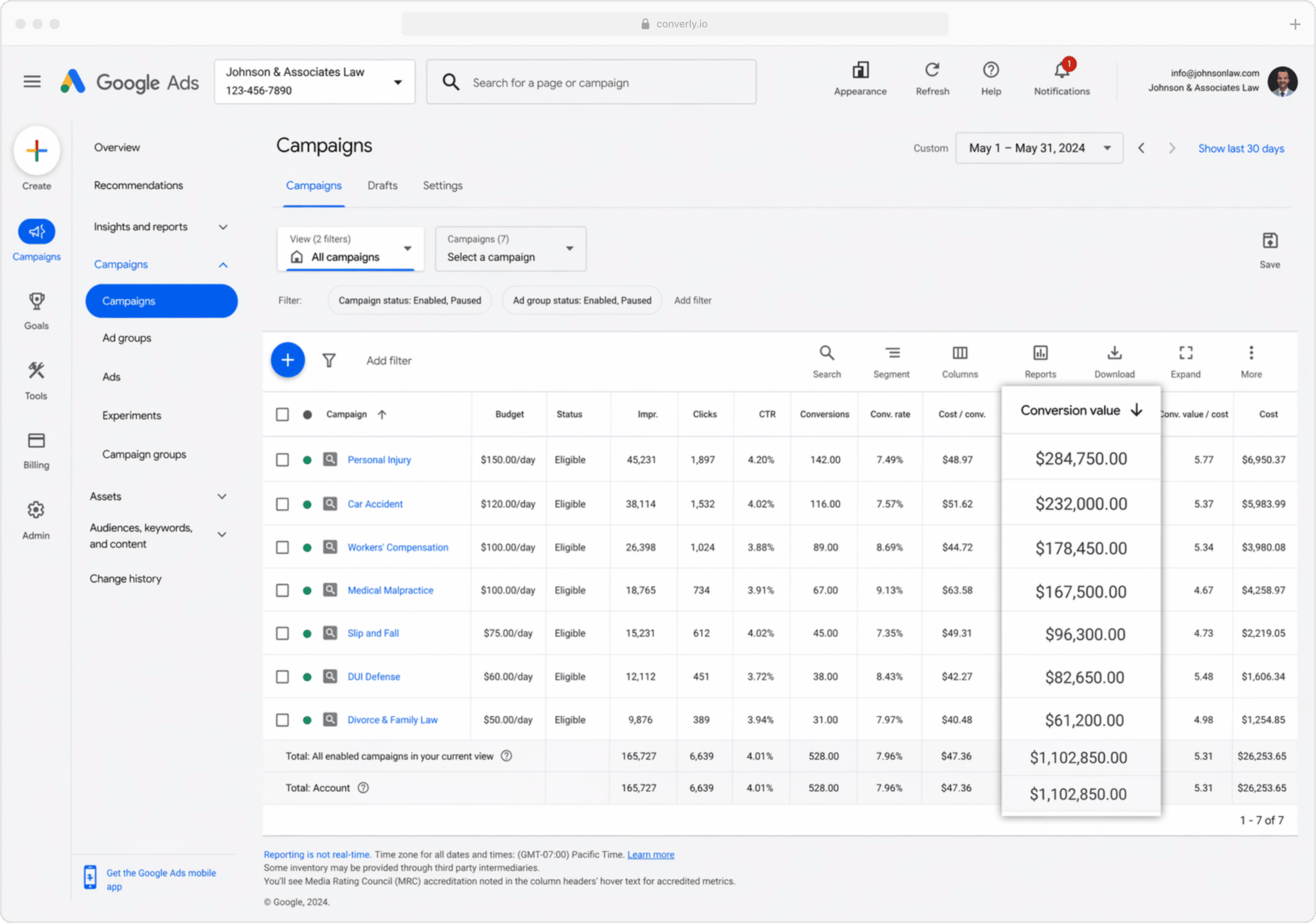
When you send conversions back to Google Ads from HubSpot, you can attach a value to each one (taken from the deal amount on the HubSpot record).
This matters because not every customer is worth the same. For a home renovation company, a lead who books through a bathroom refresh campaign is worth a fraction of one who comes in via a whole-home build campaign, so counting them as equal would paint a misleading picture.
Pass a conversion value through from HubSpot and you can build reports that show you brought in X from one campaign's leads and Y from another's. That makes it far easier to decide where your budget belongs.
3. Conversions by Geography
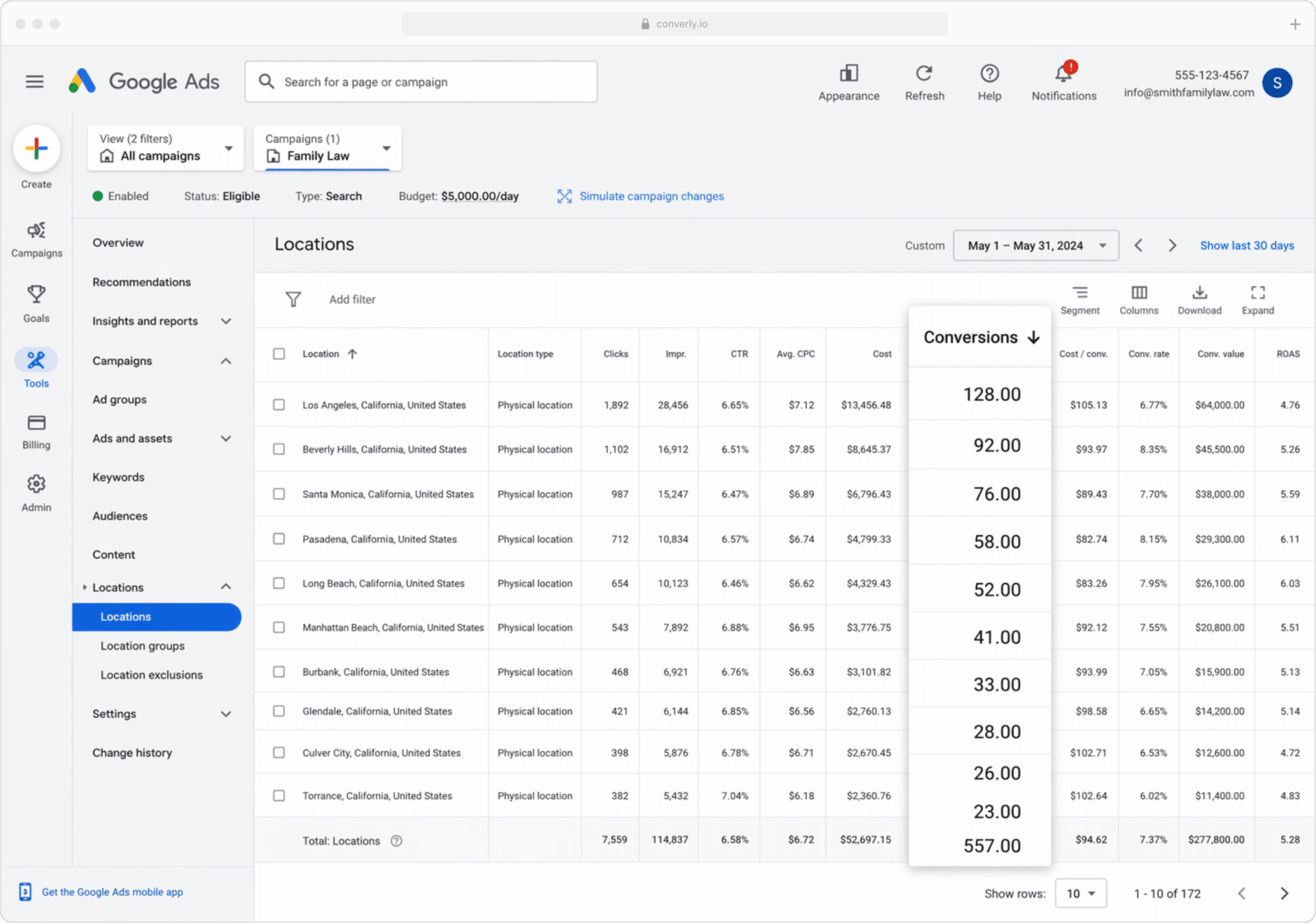
This one is ideal for businesses that win most of their work locally (builders, remodelers, roofers and the like). It splits your conversions out by geographic area.
You can keep the view wide (country, state or city) or zoom right in to a single postcode. Either way, you get to see whether your leads are actually coming from the areas you want to serve, or whether budget is quietly draining into suburbs too far away to bother with.
Armed with that, Location Bid Adjustments let you do something about it. You can tell Google to bid more aggressively in the postcodes that deliver, and pull back (or switch off completely) in the ones that rack up impressions and clicks but never become bookings and customers.
Wrap Up
Getting conversion tracking right in Google Ads can seriously improve the ROI of your campaigns.
It gives you the numbers you need to make manual adjustments (bidding up on specific keywords or locations), and it gives Google's smart bidding algorithms the accurate data they need to run automated bidding on your behalf.
But every bit of that depends on the conversion data being accurate. Rely on confirmation page visits or browser events fired through Google Tag Manager and you simply aren't sending Google solid data, and your ROI will suffer as a result.
So whichever setup you settle on, and whenever you decide to fire the conversion (at the moment of booking, once the lead becomes a customer, etc.), sending it server-side will get you the best results.
Get Started For Free
Start your 14-day free trial of Attributer today!

About the Author
Aaron Beashel is the founder of Attributer and has over 15 years of experience in marketing & analytics. He is a recognized expert in the subject and has written articles for leading websites such as Hubspot, Zapier, Search Engine Journal, Buffer, Unbounce & more. Learn more about Aaron here.